
iGuard In-Depth
How iGuard works.
A presence sensor. A countdown. A shut-off switch. Three simple things, working together, so a forgotten pot never becomes a fire.
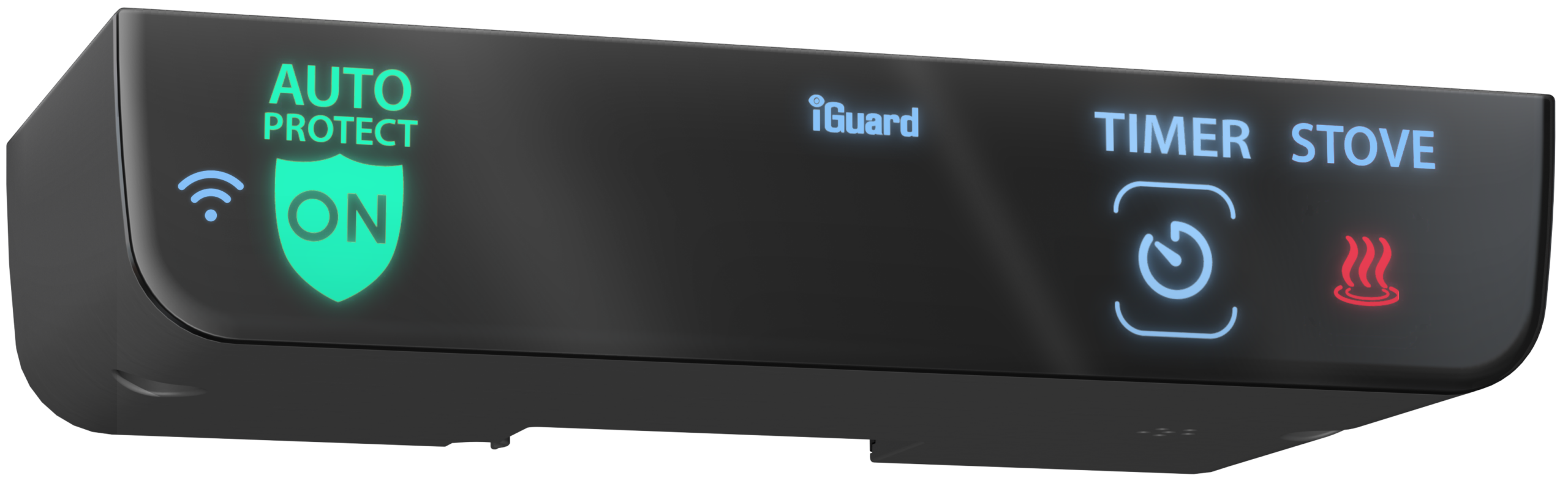
Sense. Count. Shut off.
It senses you.
The patented presence sensor watches the cooking area. Every time it sees you, the countdown resets to a full five minutes. Over and over. You just keep cooking.
It counts down.
Leave the kitchen and the five-minute countdown runs. Just before it ends, iGuard reminds you, so you can come back.
It shuts off.
Only when you’re gone the full five minutes does iGuard turn the stove off. Cooking something long? The extended cooking timer takes over.


Cooking. iGuard sees you in the kitchen.
Shown sped up: 5 minutes in a few seconds.
Extended Cooking Timer
Cooking a roast?
No need to check in every 5 minutes.
The Extended Cooking Timer allows for longer periods of uninterrupted, unattended cooking, for things like a roast, without having to come back to the kitchen every 5 minutes.
Set it.
Tap TIMER. The display starts at 0:30, which is 30 minutes. Use + and – to set the time you need.
Walk away.
While the timer runs, you don’t have to come back every 5 minutes. Leave the roast to cook.
It shuts off.
When the timer runs out, iGuard turns the stove off and the display shows OFF.


Timer set for 30 minutes. You can leave the kitchen.
Shown sped up: 30 minutes in a few seconds.
The iGuard app
Their stove.
Right on your phone.
Connect iGuard to WiFi and check on the stove from anywhere. See if it’s on, off or locked, lock it with one tap, set a lock schedule, and see how the stove is being used.
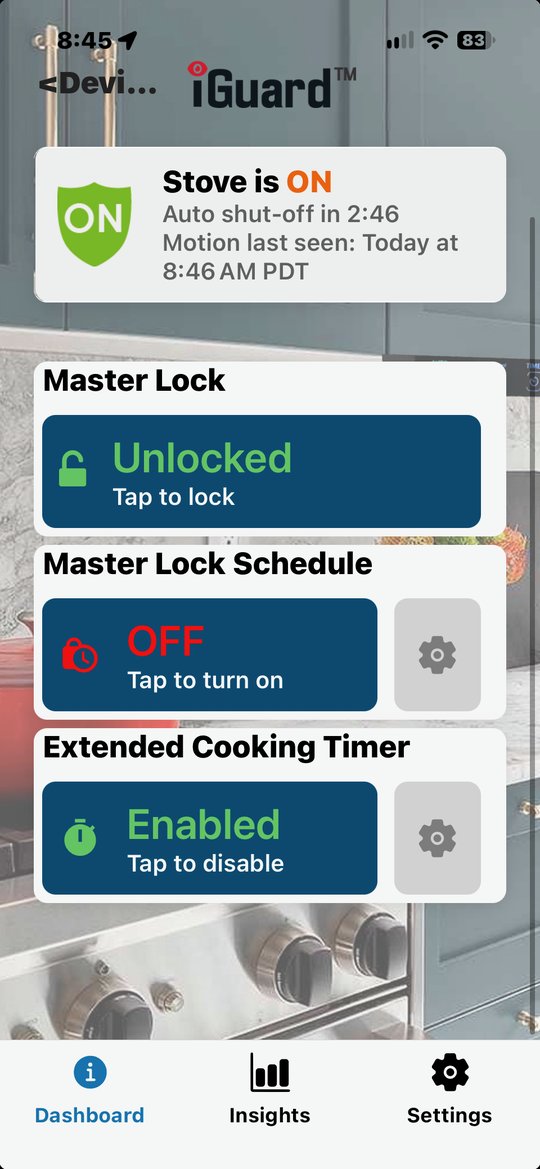
See the stove’s status.
On, off or locked. While it’s cooking, a live countdown to auto shut off, and when someone was last seen in the kitchen.
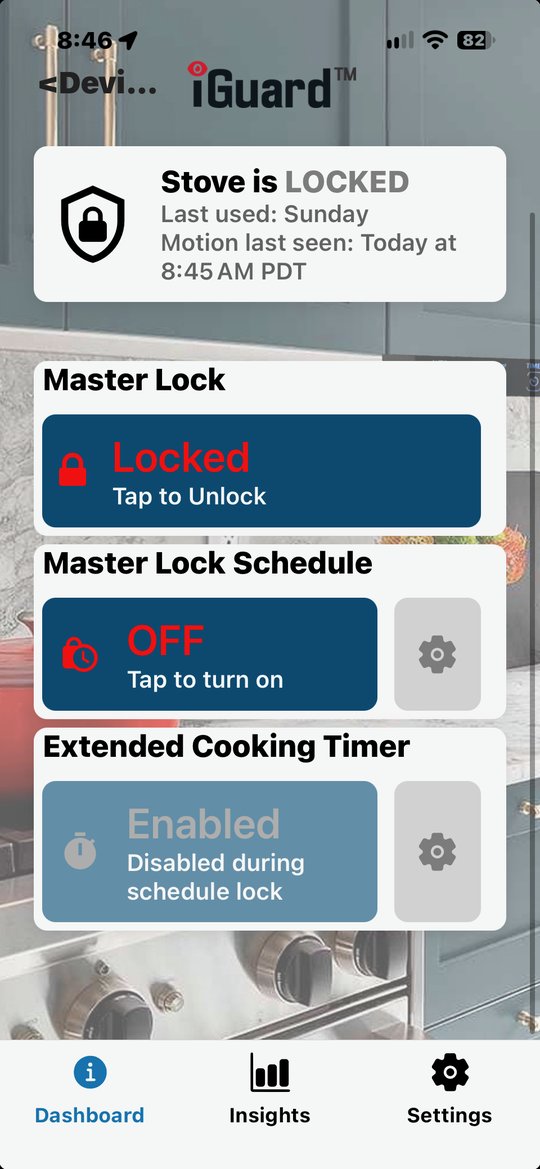
Lock it from anywhere.
One tap on Master Lock keeps the stove off until you unlock it. No matter where you are.
All times shown in PDT
You can add more than one schedule. Times can’t overlap on the same day.
Lock it on a schedule.
Pick the days and hours the stove stays locked, like overnight. Set it once, and it happens every day.
See how the stove is used.
The Insights tab tracks every time the stove is used and every time iGuard had to step in. A change in the pattern can be an early sign that something has changed.
- Safe shutoffs: the stove was turned off by the cook
- Auto shutoffs: the stove was forgotten, and iGuard turned it off
Every feature.
These work on the device itself. No app. No WiFi.
Patented presence sensor
Senses movement in the cooking area and reacts accordingly.
5-minute auto shut off
Every time it sees you, the countdown resets. Only after a full five minutes away does the stove turn off.
Extended cooking timer
Overrides the presence sensor so you can cook a roast or simmer a soup. When the timer ends, the stove turns off.
Connect iGuard to WiFi and add all of this.
Master Lock
Lock or unlock the stove remotely.
Scheduled Master Lock
Our most popular feature. Keep the stove off at set times, like 3 a.m. while others sleep.
Child Lock
A second layer of protection. A turned knob won’t power the stove until a confirmation button is pressed.
Audible and visual alerts
A reminder just before shutoff, so you can come back and keep cooking.
Insights reporting
Forgotten-cooking events on a calendar, so family and care workers can see changes over time.
Remote monitoring
Text and email alerts, stove usage and settings, from your online account.
Good Morning message
A text first thing in the morning when your loved one is up and moving.
Daytime activity alerts
An alert if there’s been no kitchen activity for a while.
Nighttime activity tracking
Late-night activity is recorded, so you can see if sleep is changing.
Room temperature monitor
An alert to you, a neighbour or a building manager if the room gets too hot or cold.
Multiple iGuards
Manage many units from one account. Built for multifamily and care facilities.
Firmware updates
New features and improvements arrive over WiFi, for years.